
Most WordPress and WooCommerce migrations don't fail on the data. They fail on the details — URLs that weren't redirected, SEO metadata that got dropped, customer accounts that broke on day one, or a product catalogue that imported with 200 missing images. We've cleaned up enough of these to know exactly where things go wrong, and how to make sure they don't.
This is what a properly handled WordPress to Shopify migration actually looks like — and what's worth knowing before you start one.
Why Merchants Move from WordPress to Shopify
The reasons we hear most often aren't about features. They're about maintenance. WordPress requires constant plugin updates, security patches, hosting management, and developer involvement for things that should be simple. WooCommerce adds another layer — its own updates, its own compatibility issues, and its own performance overhead on top of everything else.
Shopify removes that maintenance burden. Hosting, security, PCI compliance, and platform updates are all handled. Merchants focus on their store, not their stack. For businesses whose team isn't technical, that shift alone is worth the migration cost.
The other common driver is performance. WooCommerce stores frequently underperform on mobile — plugin bloat, unoptimised hosting, and accumulated technical debt create slow page loads that affect conversion rates and rankings. Shopify's infrastructure handles performance at scale without manual configuration.
What Actually Makes This Migration Complex
On the surface, moving from WooCommerce to Shopify looks like a data export and import. In practice, the complexity lives in the edges:
-
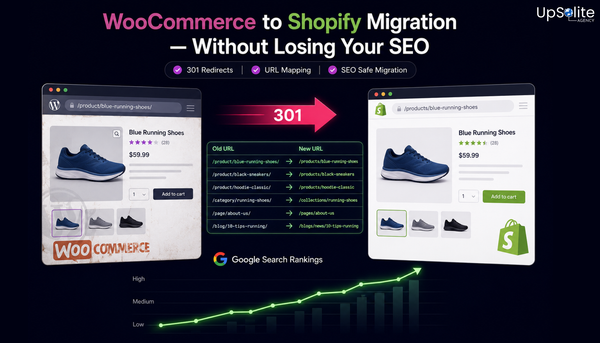
URL structure changes. Shopify uses a fixed URL structure —
/products/,/collections/,/pages/. Your WordPress URLs almost certainly don't match. Every URL that changes without a redirect is a broken link and a lost ranking signal. - Customer passwords can't migrate. WooCommerce encrypts passwords in a way Shopify can't read. Customers will need to reset their passwords after migration. How you communicate this — and when — affects customer trust and account activation rates.
- Order history has limits. Historical orders can be imported for reference, but they won't connect to Shopify's fulfilment or returns system the same way native orders do. Decisions need to be made upfront about what to bring across and what to archive.
- Product data is rarely clean. WooCommerce product data accumulated over years often has inconsistencies — duplicate categories, missing alt text, variant data stored in custom fields, attributes that don't map cleanly to Shopify's structure. Import without cleaning produces a messy catalogue.
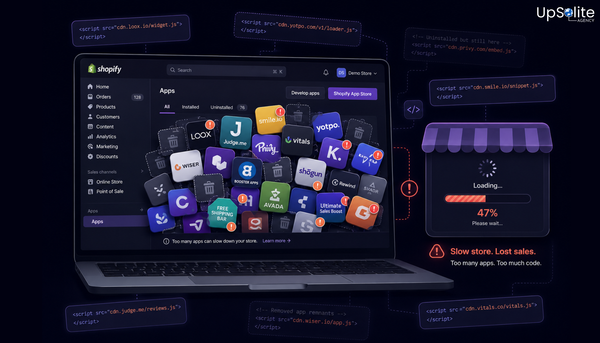
- Apps don't transfer. WooCommerce plugins don't have Shopify equivalents that configure themselves. Reviews, subscriptions, loyalty programmes, and email flows all need to be rebuilt in the Shopify ecosystem.
What We Handle in Every Migration
When we manage a WordPress to Shopify migration, it covers more than moving data from one place to another.
Data Migration
- Products, variants, images, and categories — cleaned and mapped to Shopify's structure
- Customer records — with a clear account reactivation strategy for password resets
- Order history — structured for reference and filtered to what's operationally useful
- Blog content and pages — reformatted for Shopify's structure, not just copy-pasted
SEO Preservation
- Full crawl of the existing WordPress site before migration begins
- Complete URL mapping from old structure to new Shopify URLs
- 301 redirects for every changed URL — no exceptions
- Meta titles, descriptions, and image alt text carried across and reviewed
- Google Search Console updated with new sitemap post-launch
- Rankings monitored for the first 30–60 days after go-live
Theme and UX
- Shopify theme selection or custom build based on the store's requirements
- Homepage, collection pages, and product pages rebuilt to match brand standards
- Mobile optimisation reviewed on real devices before launch
- Navigation, footer, and content pages reconstructed
Apps and Integrations
- Review platform migration (or fresh setup with historical import if possible)
- Email platform reconnection and list transfer
- Analytics reinstallation — GA4, Meta Pixel, TikTok Pixel, and any attribution tools
- Any custom WooCommerce functionality assessed for Shopify equivalents or custom builds
The Pre-Migration Checklist
- ✅ Full site backup before anything is touched
- ✅ Complete crawl of all live URLs — products, collections, pages, blog posts
- ✅ Export of all product, customer, and order data
- ✅ Audit of all active WooCommerce plugins and their Shopify equivalents
- ✅ Current Google Analytics baseline recorded for post-migration comparison
- ✅ URL redirect map prepared and reviewed before launch
- ✅ Staging environment set up on Shopify for review before go-live
What a Good Launch Looks Like
We don't go live until the staging environment has been reviewed in full — product pages, checkout, mobile layout, redirects, analytics, and payment processing. The launch itself is scheduled to minimise disruption, with DNS changes timed to reduce downtime to near zero.
In the first 48 hours after launch, we monitor for 404 errors, check redirect chains, verify analytics tracking, and confirm checkout is processing correctly. The first two weeks after a migration are when most issues surface — having the right team in place to catch and fix them quickly is the difference between a smooth launch and a painful one.
How Long Does It Take?
Timeline depends on catalogue size and complexity. A standard WooCommerce store with under 500 products, straightforward data, and a theme-based build typically takes 3–6 weeks. Larger stores with complex product data, custom functionality, or significant content to migrate take longer — typically 6–12 weeks for a full professional migration with proper SEO handling.
Rushing a migration to save time almost always costs more time later in fixes, SEO recovery, and customer issues.
🔥 Ready to Move Off WordPress?
We handle WordPress and WooCommerce to Shopify migrations end to end — data, design, SEO, apps, and launch. Get in touch and tell us about your store. We'll give you a clear picture of what's involved, how long it takes, and what it costs — before you commit to anything.